Trysil Expert: design your model without writing code
Trysil is code-first. You write a plain Delphi class, decorate it with [TTable], [TColumn], [TPrimaryKey] and the rest, and the framework does the mapping. That’s the model you’ve seen in every post on this blog.
But there’s a second way in, and it ships in the box: Trysil Expert, a visual designer that lives inside the IDE. You draw your entities and columns in a dialog, and the Expert generates two things from that single source — the DDL script to create the database, and the Pascal units with all the attributes already in place. No boilerplate typed by hand, and the SQL schema and the entity classes can never drift apart, because they come from the same model.
This post walks through the Expert end to end, building a small Customer / Order model.
The Expert is an optional IDE plugin (IOTA), packaged for every supported Delphi version (10.3 Rio through 13 Florence). Once its design-time package is installed, it shows up as a top-level menu.
Where it lives
After installing the design-time package you get a Trysil menu in the IDE main menu bar, plus a matching toolbar:
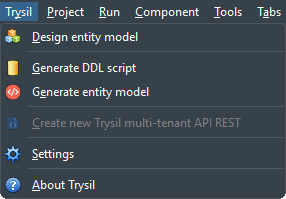 The Expert installs as a native IDE plugin — a top-level Trysil menu, no external tool to launch.
The actions, top to bottom:
- Design entity model — the visual designer (the heart of the Expert).
- Generate DDL script — emit the
CREATE TABLE/CREATE SEQUENCEscript for a target database. - Generate entity model — emit the Pascal units with Trysil attributes.
- Create new Trysil multi-tenant API REST — scaffold a brand-new REST project (enabled only when no project is open, since it creates one).
- Settings and About.
The model itself isn’t stored in your source. It’s persisted as JSON in a __trysil folder inside the project directory — versionable, separate from the generated code, and the single source both generators read from.
The design surface
Design entity model opens the main editor: entities on the left, the selected entity’s columns on the right.
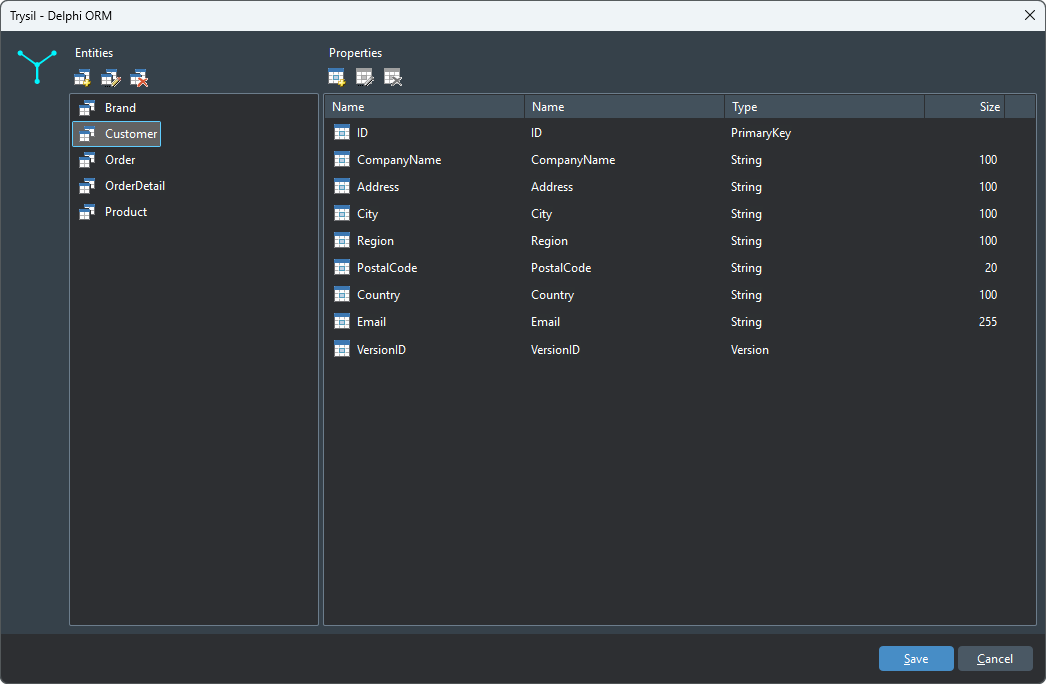 Entities on the left, columns of the selected entity on the right. Here the Customer entity with its full column set.
The toolbars above each panel add, edit, and delete — entities on the left, columns on the right. Everything you do here updates the in-memory model; Save writes it back to __trysil.model.
Defining an entity
Adding an entity asks for three things:
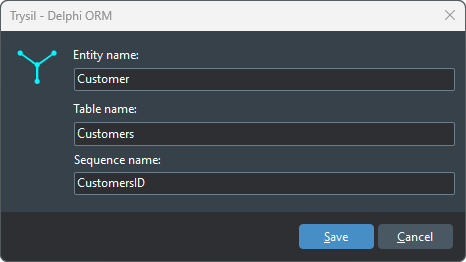 Entity name drives the rest: the table name and sequence name are suggested automatically.
- Entity name — the Delphi class name (
Customer→TCustomer). - Table name — suggested from the entity name (
Customer→Customers). - Sequence name — suggested as
<TableName>ID(CustomersID), the convention Trysil uses for identity generation.
The suggestions are just defaults; override any of them when your schema doesn’t follow the convention.
Adding columns
A property can be one of three kinds, and the Expert asks which before showing the details:
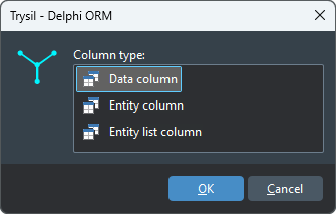 Three kinds: a plain data column, a single relation, or a relation list.
- Data column — a scalar field mapped to a table column.
- Entity column — a single related entity (a foreign key, materialised lazily as
TTLazy<T>). - Entity list column — the other side of a relation, a collection (
TTLazyList<T>).
A data column carries the property name, the column name, the data type, a length, and whether it’s required:
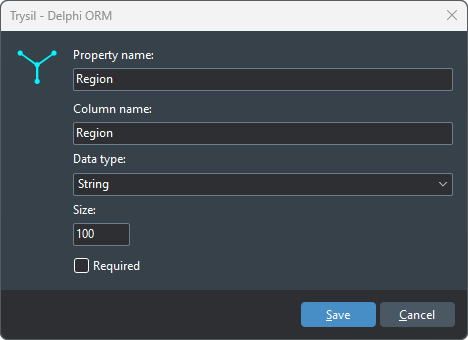 A scalar column: property name, mapped column name, data type, size, and the required flag.
An entity column instead points at another entity in the model — the Expert needs the property name, the foreign-key column, and which entity it refers to:
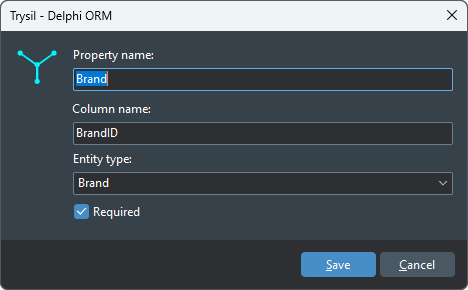 A relation column: the foreign key on this table and the entity it points to.
That’s the whole modelling loop — entities, scalar columns, relations — done entirely in the designer. Now the payoff: turning the model into a database and into code.
Generating the database
Generate DDL script asks for the target database engine and the entities to include:
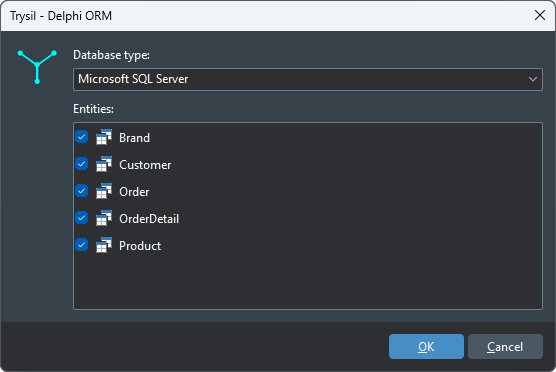 Pick the database engine and the entities; the script is dialect-specific.
The generated script is dialect-aware — sequences, identity columns, and types follow the engine you picked. Here’s the SQL Server output for Customers:
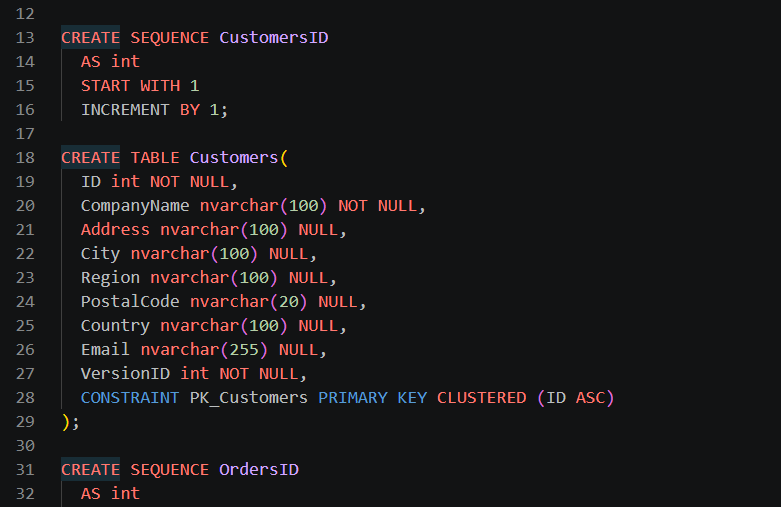 CREATE SEQUENCE, CREATE TABLE, primary-key constraint — generated, not hand-written.
Note how the schema mirrors the model exactly: CustomersID sequence, nvarchar(100) for the 100-length string columns, VersionID for optimistic locking, the primary key on ID.
Generating the entity code
Generate entity model is the other half. It asks where to put the units and how to name them:
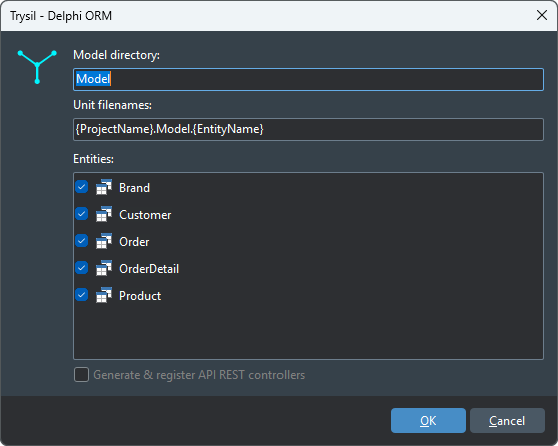 Output folder, unit-name pattern, and the entities to generate. Optionally scaffold and register REST controllers too.
The unit-name pattern ({ProjectName}.Model.{EntityName}) keeps generated files predictable. And here’s what comes out — the same TCustomer you’d otherwise type by hand:
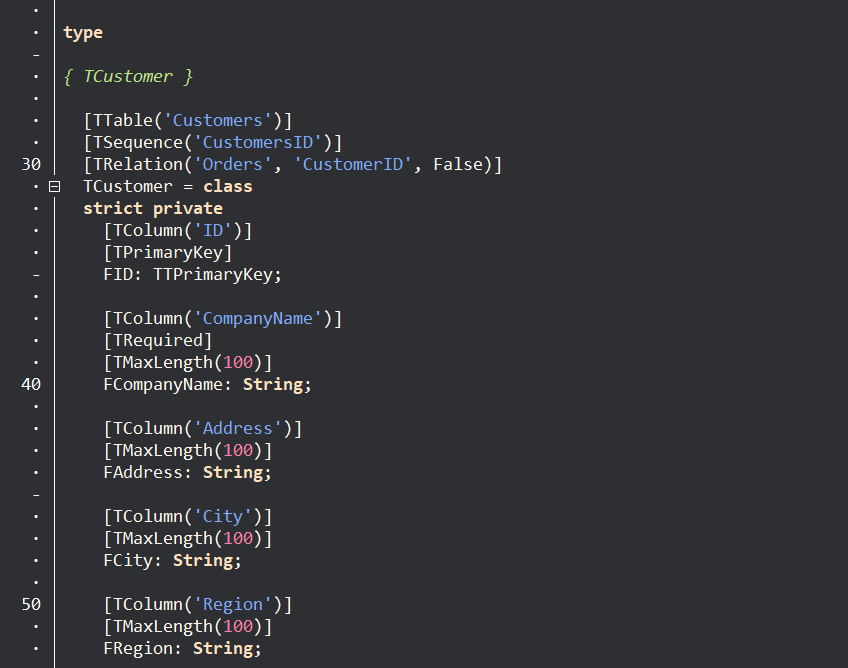 The generated unit: every attribute already in place — table, sequence, relation, columns, primary key, validation.
This is the point of the Expert. [TTable('Customers')], [TSequence('CustomersID')], the [TRelation('Orders', 'CustomerID', False)] back-reference, [TColumn] / [TPrimaryKey] / [TRequired] / [TMaxLength(100)] — none of it typed by hand, all of it consistent with the DDL you generated a moment ago.
Scaffolding a REST API
The last action goes one step further. Create new Trysil multi-tenant API REST launches a wizard that scaffolds an entire REST project — not just the model, but the HTTP host around it:
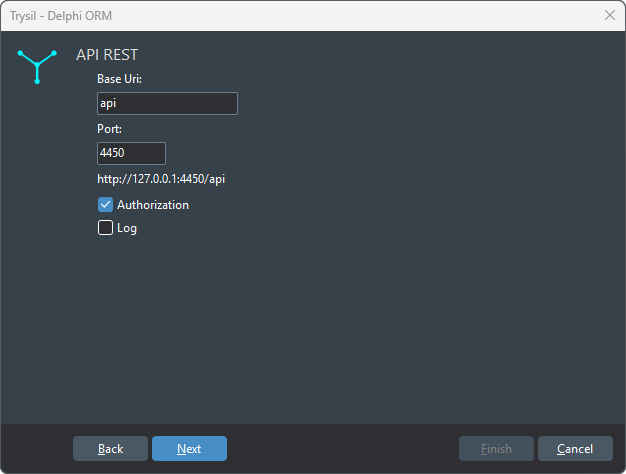 The REST wizard: base URI, port, authorization, and logging — the starting point of a Trysil HTTP project.
This is enabled only when no project is open, because it creates a new one. It’s the fastest path from “empty IDE” to a running Trysil HTTP endpoint backed by your entities.
Where it fits
The Expert doesn’t replace hand-written entities — plenty of real models need attributes the designer doesn’t surface, and you can always edit the generated units afterward. What it removes is the tedious, error-prone part: keeping a database schema and a set of entity classes in sync by hand. Design once, generate both, and the two can’t drift.
If you’ve been hand-writing every [TColumn], give it a session in the designer. Your first model is a few minutes of clicking, and the output is code you’d have been proud to write yourself.
Update — 2026-06-11. The Trysil menu has gained one more action: Install AI assistant skills. Trysil ships a set of tool-agnostic instruction files that teach an LLM how to use its public API — the ORM, the JSON layer, and the HTTP module — and the Expert downloads them straight into your project, in the layout your coding assistant expects (Claude Code, Cursor, Copilot, Windsurf, or a generic folder). Pick your tool and your AI pair-programmer knows Trysil’s attributes,
TTContext, the filter builder, and the rest — no documentation to paste into the prompt. Same idea as the generators in this post: let the tooling remove the boilerplate, here the boilerplate of explaining the framework to a model.